Open: "Good morning, everybody, and welcome. It's a pleasure and an honor to be here presenting on my first love, technology. Since we are educators, in true fashion, I hope to have us do an engaging session. Feel free to stop me, challenge me, ask questions."
Introduce yourself: "I am Dr. Sayyid Cato. My background in instructional design and technology, as well as instructional technology and media, showcases my interest in emerging technologies that benefit learners. Today that translates into AI and its use in pedagogical and andragogical strategies."
Set the frame: "I know most of us teach at the tertiary level. Some of us are graduate students. The premise today: break this into three main parts, and fit as much in as we can given the time constraints." Then click Next to show the map.
Today's working hour on AI in the classroom.
Vote your gut reaction first. Listen to a five-minute podcast with hidden prompts. Work through five strategies. Revisit the vote at the end to see what moved.
Frame the three parts: "So the premise today is I would like to break this into three main parts, and I'll try to fit as much in as I can given the time constraints. We'll spend our time on the instructor's role, the student's role, and the role of AI itself."
Invite them to write: "Before I share my framing, I want to hear yours. On each card, write a few words. What is the role of the instructor in the age of AI? What about the student? And what is the role of AI itself? Write down whatever comes to mind for each."
Set the rule: "Don't worry, what you write stays private to you for now. We'll come back to it shortly."
Then click Next.
Three parts in 60 minutes
The Instructor's Role
What is the instructor's role in the age of AI?
Which of your own assignments live up to that role?
Responses stay private. Common themes are revealed when we reach the instructor section.
The Student's Role
What are your thoughts on the student's role?
Which student behaviors show that role in action?
Themes from this card are revealed when we reach the student section.
The Role of AI
What is AI's role in your teaching and your students' learning?
Which tools would you use, and what would you use them for?
Combined with the room's list when we reach the section on AI.
Bridge from the roadmap: "Forget everything that I just told you to write down just now and that you wrote down. Just go with your gut. Should we ban it? Should we ignore it, or should we embrace it? Don't tell me what you think I want to hear. Just tell me what your gut says initially."
Run the poll. Hands up or tap for each. Don't coach, don't resolve.
If 'Ban it' tops, say: "I appreciate the fact that we are honest about gut reaction, because often technology disrupts, and anything that disrupts our processes that normally lead to success and efficiency is an uncomfortable feeling that we have to face. Imagine if I said, in the early days of the internet, 'Let's ban the internet,' because educators then were worried about students becoming a part of this copy and paste culture and the internet was going to ruin everything. The same thing with a calculator. It would not help with problem solving, and it would stop students from thinking. Today that's not the case."
If 'Ignore it' tops, say: "I appreciate the honesty here too. Ignoring something doesn't make it go away. It just means we lose the chance to shape how it gets used. Students are already using AI whether we acknowledge it or not. Imagine if educators had just ignored the internet and said nothing, leaving students to figure it out on their own. The students who needed our guidance most would have been the most lost. We don't want to be in that position with AI."
If 'Embrace it' tops, say: "I love the openness, and I share it. But embracing AI without structure can leave students skipping the foundational work they actually need to build. Embracing it doesn't mean letting it do the thinking for them. It means designing assignments where AI helps but the learning still happens. That's the harder conversation, and that's what the rest of the hour is about."
Then pivot: "Whichever camp you landed in, the real question isn't yes or no. It's how, and on which assignment. That's where we're going next."
Ban it, ignore it, or embrace it?
No coaching. No nuance yet. Your honest gut reaction right now. We are saving this number for the end of the hour.
Your honest gut reaction to students using AI?
Tap an option to cast a vote.
Set up the podcast: "Now I'm going to play a podcast for you that I created using an AI tool called NotebookLM. Before I play it, quick show of hands. How many of you are familiar with NotebookLM?"
Pause and take a count.
Then ask: "How many of you have used it? How many of you are using it now?"
Take the second count. This tells you whether to demo NotebookLM in the toolkit later.
Set the rule before pressing play: "Listen carefully because inside this podcast, there are going to be little exercises that tell you what to do as you listen. Don't write anything down right now. Just listen. Listen all the way through, and even rewind it if you need to so you catch everything. After it plays, I'll show you the cards with the exercises."
Play and shut up. Five minutes. Step back. Watch the room.
A podcast on AI in pedagogy
Five minutes. NotebookLM hosts. Listen for the four prompts they slip in.
Your NotebookLM podcast goes here
Auto-loaded from /videos/podcast-main.m4a. Use the button above to swap in a different file on the fly.
Reveal the cards: "Okay, now that you've listened, here are the four exercises the podcast asked you to do. I'll flip them over one at a time. After you see each one, tap the colored ball for the color you picked. Green, yellow, or red. We'll reveal the whole room's picks at the end."
Flip card 1. Pause for them to tap a color, about 20 seconds.
Flip card 2. Pause again, 20 seconds.
Flip card 3, then say: "This one's about your own course. Name one assignment in your head. Now tap the color you'd give it right now. Take 60 seconds."
Flip card 4, then say: "Last one. Imagine the smallest change to that same assignment. Tap the color it becomes after your redesign."
Click Reveal. The percentages light up on each card. Read them out loud: "On card one, 40% of you said green, 35% yellow, 25% red. Interesting split." Surface where the room agreed and where it didn't.
Call the share: "Now turn to one person near you and tell them what color you picked for your own assignment, and why. Ninety seconds. Then we'll pick two to share with the room."
The four exercises from the podcast
Click a card to flip. Tap a colored ball for your call. We reveal the room's picks at the end.
Graduate students must write a 1000-word literature review of recent research on climate adaptation policy.
What color would you give it?
Students design a community engagement plan and identify three stakeholders to interview.
What color would you give it?
Pick one assignment from your own class right now. Just one. Name it.
What color is your assignment right now?
Look at the assignment you just named. What is one of the smallest changes you could make that would either shift its color or make it harder for AI to hand the answer over?
What color is it after your redesign?
Review the framework while it is fresh: "The podcast just walked you through these. Look at them once more. Green means AI is encouraged. Yellow means it is allowed but you have to disclose. Red means no AI on this assignment."
Then run the sorter with the room: "Here are three quick scenarios. For each one, hands up for the color you would give it."
Read each scenario. Take a quick count for each color. Surface the disagreement. That is where the conversation lives.
Callback to the nuggets activity: "Remember the four exercises from the podcast? All four were designed so AI cannot pre-answer them for anyone. The first two gave you a specific example assignment and asked you to apply the traffic light to it, which requires interpretation and judgment, not memorization. The last two used your own assignment, which AI cannot touch because it does not know your syllabus. That same design principle is what makes the traffic light work. This is the trick: you are showing them how to bypass AI as they create their own assignments."
The Glass Syllabus AI Traffic Light
A framework instructors use to label each assignment with one color, signaling exactly how much AI is allowed on that specific task. The point: stop treating AI as a single yes-or-no rule for the whole course. Start deciding per assignment, on purpose, with a reason students can see.
01Build apps & interactives
For building dashboards, classroom tools, and student-facing components from a prompt.
Claude
Build-anything assistant for dashboards, gradebooks, model papers, rubrics, even this page.
Build itLovable
Describe what you want, get a full-stack web app you can edit and deploy.
Prompt to appBase44
AI no-code app builder with database and auth built in. Good for class portals.
No-code appReplit
In-browser dev environment with an AI agent. Run code with your students live.
Build with AI02Code & agentic workspaces
More technical. AI agents that handle full development workflows.
Codex
OpenAI's agentic coding assistant. Plans, edits, runs, tests across a codebase.
Code agentGemini Antigravity
Google's agentic IDE with Gemini for end-to-end engineering work.
Agentic IDEGoogle AI Studio
Build and prototype with Gemini models directly, including image and audio.
Prototype with GeminiGoogle Stitch
Turns plain language prompts into UI designs and front-end code.
Design to code03Audio & voice
Turn your notes or sources into listenable content for your students.
04Video & visual design
For lesson visuals, slide decks, custom video for tricky concepts.
Google Flow
Turns images into short video clips for lesson intros and tricky concepts.
Show by videoGemini
Conversational image generation and editing. Source for Google Flow inputs.
Generate imagesGamma
Generates a full slide deck from a prompt in seconds, then you refine it.
Slides fastCanva (Magic)
Design handouts and infographics with built-in image and video generation.
Design it05Research & engage
For in-class engagement, research with receipts, and quick visual breakdowns.
06Others worth watching
Specialized and newer tools. Worth knowing if any match a workflow you have in mind.
Name what just happened: "What you just did was active listening. You couldn't find your assignment without paying attention. And here's the thing: the prompts weren't just tied to something only you know about your own course. They were tied to my voice. You had to listen. You had to give the audio your undivided attention. Some of you probably had to rewind to catch what was said. You stopped being passive recipients of whatever the screen feeds you, and you became active."
Make this point about retention: "Imagine if this was a 10 or 15 minute podcast you gave to your students instead of a page to read or a chapter from a textbook. Especially for the courses that are difficult to follow, students might retain more, understand more, because listening is harder to fake than skimming. They had to follow the thread."
Then take it further: "Why not have AI explain the toughest concepts of the week inside the podcast itself? Drop nuggets throughout for them to complete assignments. Make it meaningful. Make it simple and eloquent. For the concepts that are difficult, have AI explain with drawings, images, video. Include your state, your city, anything happening locally that they relate to. You know your students best. AI can make a connection to your weekly concepts using something familiar to them."
Then land the throughline: "That is the pattern I want you to see today. Engagement in the age of AI comes from students creating something to show their learning, not just consuming or copying. The build is the proof. The product is the evidence."
Then click Next into the strategies.
That podcast was strategy one
You did not just hear about a technique. You felt it. You listened on purpose because the work was hidden in the audio. You wrote answers about your own course. AI could not do that for you, because the prompts were tied to something only you know: your class.
Engagement in the age of AI comes from students creating things to show their learning.
Not summarizing. Not describing. Building. A video, a form, a presentation, a podcast, a redesign, a defense. The product is the proof, and the build is the learning.
The meta strategy. You already did it. Name it as a method they can steal.
Make this point: "You are turning students' passive reading habits, the ones that come from reading whatever AI hands back to them, into active listening. The technique works for any subject. Because students cannot find their assignment without actually listening, they have to actively process the information. They stop being passive recipients of whatever the screen feeds them. They become active recipients. Then, once they have caught the prompts, you give them something concrete to do with what they heard."
Live demo with the PDF: "Want to see how this gets made? Take the PDF I shared with you. I'm going to drop it into NotebookLM right now and show you how the audio overview is generated. This is exactly how I made the podcast you just listened to."
Open NotebookLM, drop in the source PDF, generate the audio overview. Keep it short. The goal is showing them the workflow, not a finished podcast.
The podcast with hidden assignment nuggets
The move: feed your week's readings into NotebookLM and have the hosts drop three to five little exercises students must catch by listening.
Why it works: turns passive reading into active listening. Works for any subject. Different tool, different mode, same content.
You just experienced this. The podcast you heard is exactly this method, applied to today's topic.
Active listening NotebookLMFrame the move: "The next strategy is the flip. Students still research, AI is fine for gathering. But now they create. The example I use: research an IT career, look up the requirements and qualifications, and then do a self-evaluation of where you are now and how you will get there."
Then point at the build options: "Then they create. It could be a Google Form where they flip roles and become the employer writing interview questions. It could be a video where they showcase themselves talking through the career. It could be a screen recording while they present what they found."
Make this side note about tool evolution: "Right now, Google Forms is a good choice because AI cannot really build a Google Form yet. There are tools that can build forms, like the one I use, but most students don't know that yet. For now this works. But this is exactly why we have to keep reshaping teaching, because the tools keep evolving. What's hard for AI today is easy tomorrow. So sharing their screen and presenting while they work, that one has a longer runway."
Link to mention: Google Forms is at forms.google.com.
Research becomes a build: the Google Form flip
Why it works: writing interview questions forces them inside the role. You cannot fake a good question set without actually knowing the job. The product is the proof.
Constructivism Google FormsThe two-week showpiece. Your video, deliberate errors. Private, AI cannot summarize. Next week THEY create their own video fixing the errors. Heart of the throughline. Play your sample video here.
Spot the mistakes, then create your own video
Week one: you build a spreadsheet with deliberate errors and record a short screen video walking through it. The video lives only in your course, not on YouTube, not anywhere, so AI cannot summarize it. Students watch and pinpoint where you went wrong in the discussion.
Week two (the heart): students record their own screen-and-voice video fixing those errors. They explain each fix out loud as they show it. That is the throughline in action: they create something only they could make.
Why it works: error analysis is high-order thinking, the private video defeats the AI shortcut, and the student video is "teach it to prove you know it."
Error analysis + creation Screen recorder + spreadsheetYour "spot the mistakes" sample video goes here
Auto-loaded from /videos/professor-errors.mp4. Use the button above to swap.
Turn images into classroom video with Google Flow
Frame the move: "Google Flow turns images into short videos. Great for setting up a lesson or illustrating a concept that is hard to describe in words. Custom visuals beat generic stock, and motion holds attention. A 20-second clip you made for this exact lesson lands harder than a bullet list."
Walk the demo: "Here's an example. I asked Gemini to generate a red blood cell as a still image. That's on the left. Then I dropped that image into Google Flow and asked it to animate. Watch what comes out. Hit play."
Play the video. Let it run.
Then connect it to teaching: "Now imagine doing this for any concept your students normally have to imagine. A cell dividing. A historical scene reconstructed from a primary source. A chemistry reaction. An engineering process. You're making the invisible visible. And you made it yourself, for this exact lesson, in about three minutes."
Links to mention: Google Flow is at labs.google. For the images themselves, Gemini at gemini.google.com is a strong image generator.
The move: generate strong images, then turn them into short videos to set up a lesson, illustrate a hard concept, or spark discussion. Custom visuals beat generic stock, and motion holds attention.
Why it works: a 20-second clip you made for this exact lesson lands harder than bullet points, and students remember images far longer than text.
Dual coding Google Flow + Gemini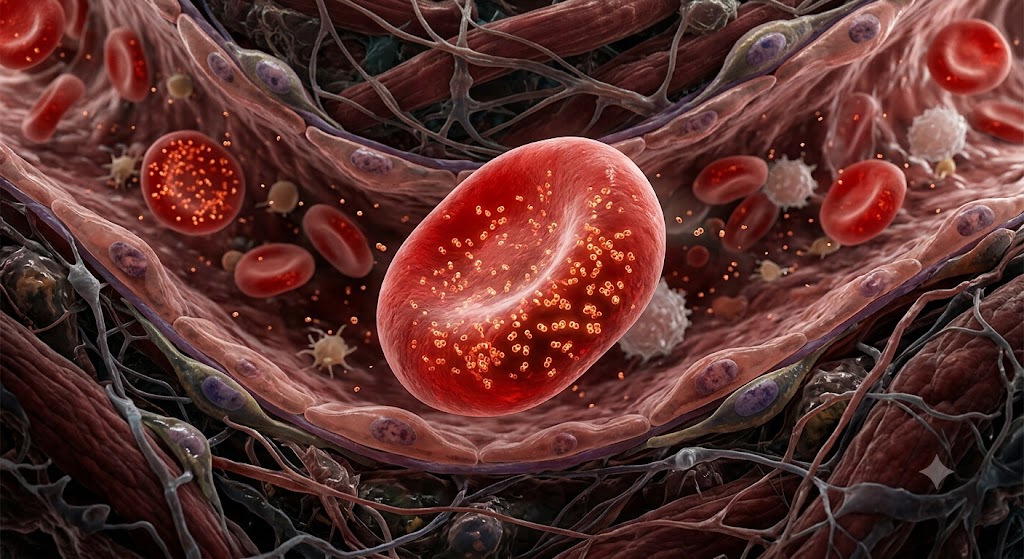
Start with a still image. I asked Gemini to generate a red blood cell. Took about 20 seconds.
Then I dropped that image into Google Flow. Hit play. Same red blood cell, now moving.
Build your own resources in Claude (this page is exhibit A)
Quick frame: "Strategy five is build your own resources right in Claude. Instead of sending students to the open web, build it yourself. A grades dashboard. A practice gradebook with student nicknames for privacy. Model papers showing what good looks like. Rubrics, study guides."
Tease the showcase: "I'm only going to mention this one quickly now, because we are coming back to it at the end of the session. I'll ask you what you would build for your classroom, and we will actually build it together using Claude. Live. On the screen."
Move on to the toolkit.
The move: instead of sending students to the open web, build the resource yourself, at college level, right here. A grades dashboard, a practice gradebook with nicknames for privacy, model papers, rubrics, study guides.
Why it works: the resource fits your course instead of a generic one, and students get one trustworthy source instead of ten sketchy tabs.
ClaudeWalk the three habits: "These are the three habits I want every student to bring to any assignment where AI is allowed. Acknowledge it. Hold it accountable. Own the thinking. These should be on every cover sheet."
Then on holding it accountable, make this point: "Holding AI accountable means students don't just take what AI hands back. They check it. They verify the claims against a real source. They flag where AI was wrong, where it oversimplified, where it missed context. They name what they had to fix, and why. Pedagogically, this is exactly what we want at the analyze and evaluate levels of Bloom's taxonomy. Andragogically, it respects that our students are adults who can interrogate sources. It is also good academic integrity practice, before integrity becomes a fight."
Then on pulling up the slack: "There's a piece I want to name. Holding AI accountable also means pulling up the slack. Students should name where AI was lacking, where it fell short, and what they had to add or correct on their own. Not just 'I checked it.' Specifically: 'AI missed this context. AI got this fact wrong. I added this from class. I rewrote this in my own voice.' That's the integrity move. It's also the learning move."
Then on owning the thinking: "Owning the thinking means the judgment, the voice, the final decisions are theirs. Not AI's. They do not submit what AI produced verbatim. They rewrite. They cite where AI helped, name where they pulled up the slack, and put their fingerprints on the conclusion. That's how the work stays theirs."
Then click the checklist live as you talk about each habit it captures.
Teaching students to use AI responsibly
Responsible use is a skill we teach, not a rule we post. Three habits do most of the work.
1. Acknowledge it
Every submission carries a short AI-use statement: what tool, what for. Normalizes honesty instead of teaching students to hide.
2. Hold it accountable
Students state what they verified, what AI got wrong, what they changed. AI is a source to fact-check, not an authority to trust.
3. Own the thinking
Judgment, voice, and final calls stay human. AI can draft. The student decides.
Show the statement: "Steal this. Put one line like this at the bottom of any assignment where AI is allowed. It takes the secrecy out of the room. Students stop hiding their AI use and start narrating it."
Steal this: the AI acknowledgment statement
Put one line like this at the bottom of any assignment where AI is allowed. It takes the secrecy out of the room.
Walk through the checklist: "Each of these is a habit you can expect from a student. Click them as we go. See if your room agrees on what counts."
Responsible-use checklist
Click each habit you expect from a student. Watch the ring fill.
Set up the toolkit: "This is a quick shelf. You don't need all of these. Match the tool to the verb. Build with Claude. Explain by audio with NotebookLM. Show by video with Google Flow. Read the room with Mentimeter. Pick two and go deep."
The toolkit: what to use and what for
An honest shelf. Match the tool to the verb, pick two, and go deep.
01Build apps & interactives
For building dashboards, classroom tools, and student-facing components from a prompt.
Claude
Build-anything assistant for dashboards, gradebooks, model papers, rubrics, even this page.
Build itLovable
Describe what you want, get a full-stack web app you can edit and deploy.
Prompt to appBase44
AI no-code app builder with database and auth built in. Good for class portals.
No-code appReplit
In-browser dev environment with an AI agent. Run code with your students live.
Build with AI02Code & agentic workspaces
More technical. AI agents that handle full development workflows.
Codex
OpenAI's agentic coding assistant. Plans, edits, runs, tests across a codebase.
Code agentGemini Antigravity
Google's agentic IDE with Gemini for end-to-end engineering work.
Agentic IDEGoogle AI Studio
Build and prototype with Gemini models directly, including image and audio.
Prototype with GeminiGoogle Stitch
Turns plain language prompts into UI designs and front-end code.
Design to code03Audio & voice
Turn your notes or sources into listenable content for your students.
04Video & visual design
For lesson visuals, slide decks, custom video for tricky concepts.
Google Flow
Turns images into short video clips for lesson intros and tricky concepts.
Show by videoGemini
Conversational image generation and editing. Source for Google Flow inputs.
Generate imagesGamma
Generates a full slide deck from a prompt in seconds, then you refine it.
Slides fastCanva (Magic)
Design handouts and infographics with built-in image and video generation.
Design it05Research & engage
For in-class engagement, research with receipts, and quick visual breakdowns.
06Others worth watching
Specialized and newer tools. Worth knowing if any match a workflow you have in mind.
Set up the live showcase: "Earlier I mentioned strategy five, build your own resources in Claude. Let's actually do it. I want you to type into the box below: what would you build for your classroom? An interactive component, a visualization for a tough concept, a simulation, a quiz that adapts to their answers, a study tool. Be as detailed as you want. You have about two minutes."
Give them two minutes. Watch ideas come into the box. Encourage stragglers near the end of the window.
Then say: "Now I'm going to spin the wheel. We'll randomly land on three of your ideas, and we'll pick one of those to build."
Click Spin the wheel. The room watches the cards flicker through, slow down, and land on three winners with a little animation.
Read each winner out loud as it appears. Then: "Okay, let's go with [pick one]. I'm sharing my screen with Claude right now."
Build live in Claude for 3 to 4 minutes. Don't aim for perfection. Aim for showing the loop: how you prompt, how you iterate, how you shape what it gives back.
Close the loop: "This is what strategy five looks like in action. You can do this for your own course any night you have ten minutes."
What would you build for your classroom?
Throw out an interactive component you'd want for your students. We'll pick one and build it together in Claude, live.
A few ideas to spark yours
Anything you find yourself re-explaining every semester.
Wrong answers branch to targeted hints.
For students to experiment with a process.
Pulls together notes, builds quick-reference cards.
Enter your idea here
Be as detailed as possible. What interactive component would you want to build for your classroom? A visualization for a tough concept, a simulation, a quiz, a dashboard, a study tool.
Set up the revisit: "Now let's go back to the question I asked at the start. Ban it, ignore it, or embrace it? Vote again, gut reaction, no filter."
Run the poll.
Read the deltas out loud: "Did the room move? Look at this. Ban went from [X] to [Y]. Ignore from [X] to [Y]. Embrace from [X] to [Y]."
Acknowledge what moved: "Notice [whichever shifted most]. That is what this hour did. It didn't tell you what to think. It gave you a way to design what comes next."
Same question. Has anything moved?
Tap your honest reaction now. Compare to the start.
Your honest gut reaction to students using AI?
Tap an option to cast a vote.
How did the room move?
End with the ask: "Before we close, here is the one thing I am asking you to take with you. Pick one assignment. Just one. Turn it into something students create. Decide its color on purpose, with a reason students see. That is the homework."
Take a couple of questions, then thank them.
Do not solve policy today. Do one thing.
Before next term, pick one assignment and turn it into something students create.
A video, a form, a podcast, a defense, a build. One assignment. Decide its AI rule on purpose.
This whole page was built with AI. So can yours.